Introduction To Miro Board
In today’s fast-paced digital world, collaboration has evolved far beyond emails and meetings. Teams now rely on visual tools that allow them to brainstorm, plan, design, and collaborate in real time—regardless of location. One such powerful tool that has transformed how teams work together is Miro Board.
Whether you are a startup founder, designer, product manager, educator, or remote worker, Miro offers an intuitive digital workspace that replaces whiteboards, sticky notes, and even lengthy documentation. What Miro Board is, its features, benefits, use cases, pricing, and why it has become one of the most popular online collaboration platforms in the world.
What Is Miro Board?
Miro Board is an online collaborative whiteboard platform designed to help teams visualize ideas, manage workflows, and collaborate in real time. It allows users to create, share, and edit boards that include text, images, diagrams, mind maps, sticky notes, flowcharts, and more.
Originally launched as RealtimeBoard, Miro has evolved into a full-fledged digital collaboration ecosystem used by millions of professionals worldwide. It is especially popular among remote teams, product designers, UX/UI professionals, educators, and agile teams.
Key Features of Miro Board
1. Infinite Canvas
One of Miro’s most loved features is its infinite canvas. Users are not limited by page size and can expand the board endlessly to map ideas freely.
2. Real-Time Collaboration
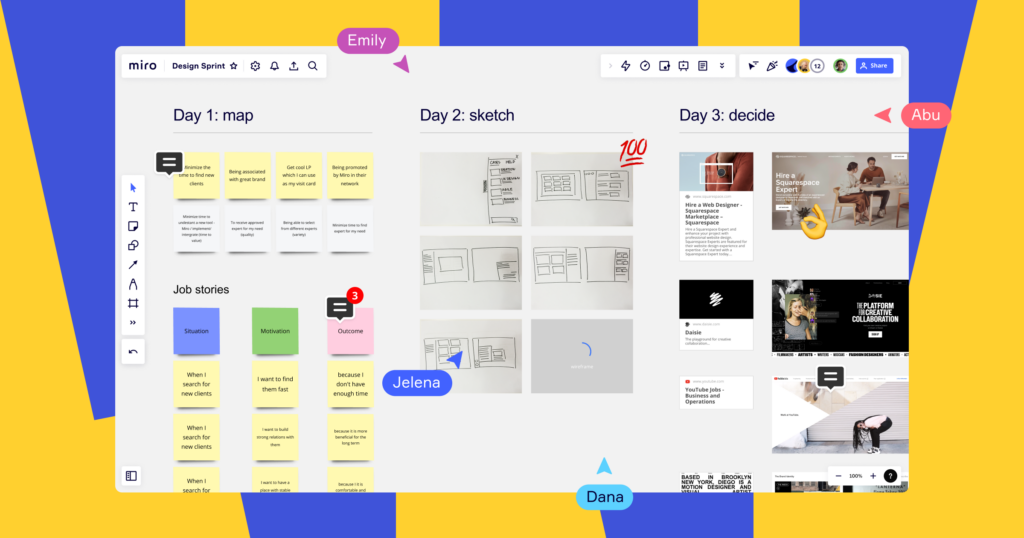
Multiple users can work on the same board simultaneously. Changes appear instantly, making brainstorming sessions highly interactive.
3. Templates Library
Miro offers hundreds of ready-to-use templates including:
- Brainstorming templates
- SWOT analysis
- User journey maps
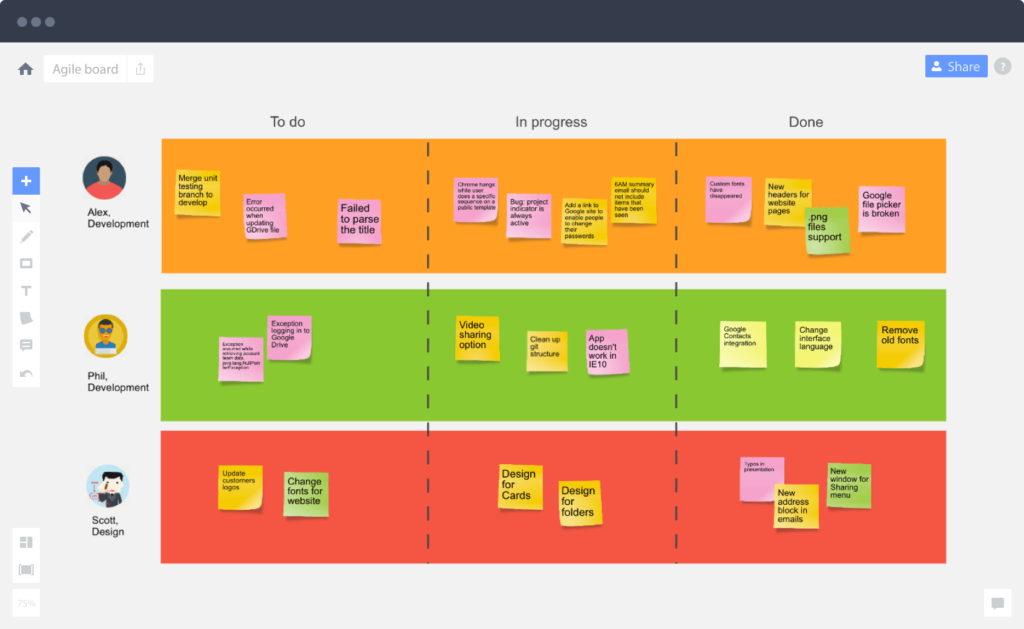
- Kanban boards
- Agile sprint planning
- Mind maps
These templates help teams get started quickly without building everything from scratch.
4. Sticky Notes and Visual Tools
Users can add digital sticky notes, shapes, connectors, images, emojis, and icons to visually organize thoughts and workflows.
5. Integration with Popular Tools
Miro integrates seamlessly with tools such as:
- Slack
- Microsoft Teams
- Google Workspace
- Jira
- Asana
- Notion
- Zoom
This makes it easy to connect Miro with existing workflows.
6. Real-Time Cursors and Comments
Each collaborator has a visible cursor, allowing teams to follow discussions live. Comments and mentions improve communication and feedback.
Benefits of Using Miro Board
1. Enhanced Collaboration
Miro Board eliminates geographical barriers, allowing distributed teams to work together as if they were in the same room.
2. Increased Productivity
Visual workflows reduce confusion and speed up decision-making. Teams can move from ideas to execution faster.
3. Better Creativity and Innovation
The flexible canvas encourages free thinking, brainstorming, and experimentation without restrictions.
4. Easy Accessibility
Miro is cloud-based and works on desktops, tablets, and mobile devices. No complex installation is required.
5. Ideal for Remote and Hybrid Teams
With remote work becoming the norm, Miro provides a central space for alignment and collaboration.
Common Use Cases of Miro Board
1. Brainstorming Sessions
Teams can quickly generate and organize ideas using sticky notes and clustering techniques.
2. Agile Project Management
Scrum masters and product managers use Miro for sprint planning, backlog grooming, and retrospectives.
3. UX/UI Design
Designers use Miro for wireframing, user flows, and journey mapping before moving to design tools like Figma.
4. Education and Workshops
Teachers and trainers use Miro to create interactive lessons, workshops, and virtual classrooms.
5. Strategy Planning
Businesses use Miro to visualize goals, roadmaps, and long-term strategies.
Miro Board for Businesses
Educators and trainers use Miro to create interactive lessons, group activities, and visual presentations. Students can collaborate on projects, brainstorm ideas, and participate actively in virtual classrooms.
Miro is widely adopted by startups, enterprises, and Fortune 500 companies. It supports enterprise-level security, single sign-on (SSO), and advanced permissions.
Benefits for Businesses:
- Improved cross-team collaboration
- Faster decision-making
- Reduced meeting times
- Better alignment across departments
Miro also provides analytics to track engagement and board activity, helping teams optimize workflows.
Miro Board Pricing Plans
Miro offers flexible pricing options:
Free Plan
- Limited boards
- Basic collaboration tools
- Ideal for individuals or small teams
Starter Plan
- Unlimited boards
- Private boards
- Basic integrations
Business Plan
- Advanced collaboration tools
- Team management features
- Enhanced security
Enterprise Plan
- Custom security settings
- Dedicated support
- Advanced admin controls
Pricing may vary depending on region and number of users, but Miro remains competitive compared to similar tools.
Miro Board vs Competitors
Miro vs MURAL
- Miro offers a smoother user experience and more integrations.
- MURAL focuses more on facilitation and workshops.
Miro vs FigJam
- FigJam is best for design teams using Figma.
- Miro is more versatile for cross-functional teams.
Miro vs Lucidspark
- Miro provides more templates and advanced collaboration features.
Why Miro Board Is So Popular
Miro’s success comes from its simplicity, flexibility, and ability to adapt to different industries. Whether you’re planning a product launch, teaching a class, or managing a remote team, Miro offers a single workspace that keeps everyone aligned.
As remote work continues to grow, tools like Miro are redefining how teams communicate and collaborate. Its ability to combine creativity, structure, and productivity in one platform makes it a powerful solution for modern work environments.
Its clean interface, powerful features, and strong community support make it one of the most trusted collaboration platforms in the market.
Tips to Get the Most Out of Miro
- Use keyboard shortcuts to speed up your workflow
- Organize boards with frames and sections
- Lock important elements to avoid accidental edits
- Use color coding for better clarity
- Save reusable templates for future projects
Final Thoughts
Miro Board is more than a digital workspace—it’s a complete collaboration ecosystem. Whether you’re brainstorming new ideas, planning projects, teaching students, or managing complex workflows, Miro provides the tools you need to succeed.
Miro Board has redefined how teams collaborate in the digital age. By combining creativity, structure, and real-time collaboration, it empowers teams to turn ideas into action faster than ever before.
Whether you are a freelancer, educator, startup founder, or enterprise leader, Miro provides the tools you need to collaborate effectively and innovate confidently.
If you’re looking for a flexible, user-friendly, and powerful visual collaboration platform, Miro Board is undoubtedly one of the best choices available today.
You May Also Read: Kai Millard Morris